
Mirivilo · iPhone Backup Viewer
Read your iPhone backups on your Mac.
Mirivilo opens the backups of your iPhone and iPad on your Mac and shows what's inside, each item readable in full. The device doesn't need to be connected: only its backup is needed.
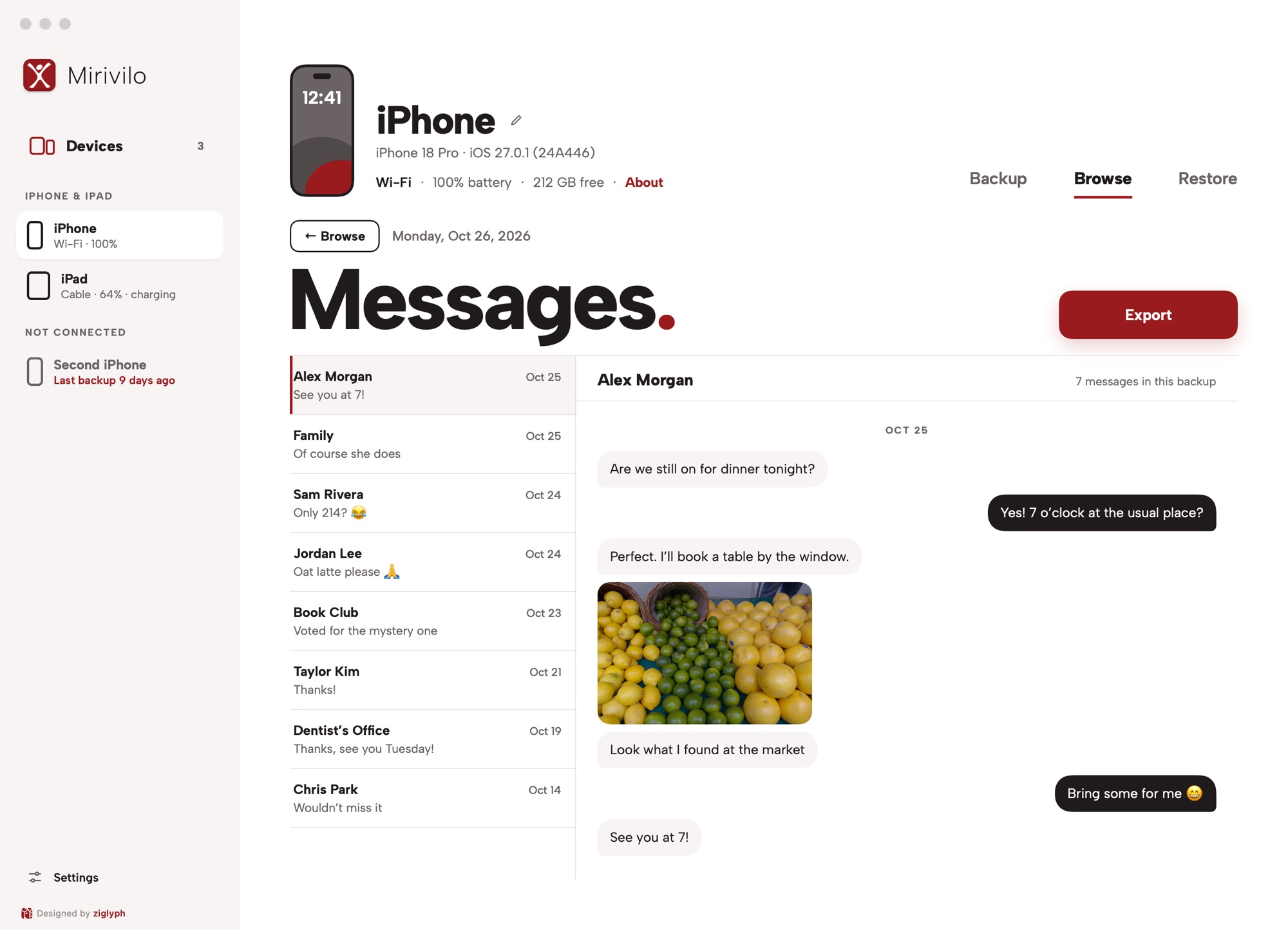
What you can read
- Messages: every conversation, the whole thread, with the day each message was sent. Pictures show in the conversation, on their sender's side.
- Photos: the camera roll by month. Select as many as you like and save the originals to your Mac. Hidden and deleted photos aren't shown.
- Contacts: the list, and each card with phone and email.
- Notes: each note's full text. A note locked with a password on the device has no text in the backup.
- Call history: who, when, which way and how long.
- Voicemail and Voice Memos: each recording, ready to play.
- Calendar: each event with its time, place and notes.
- Reminders: open ones first, with their list, due date and notes.
- Safari: the pages visited and the bookmarks.
- Health: each kind of data with its range and averages.
Apple saves call history, Health data and Safari history only in encrypted backups. Turn on backup encryption for the device in Mirivilo, and the next backup includes them.
Backups Finder made, too
Mirivilo lists the backups Finder made on your Mac, so you can read and export them as well. Reading Finder's backup folder needs Full Disk Access, which you turn on yourself in System Settings; Mirivilo asks once, when it's needed. It never moves or removes Finder's backups.
Any of the last 30 days
Mirivilo keeps a backup for each day, for 30 days. Browse opens on the latest one; pick an earlier day to see what was on your iPhone then. Restoring always puts back the latest backup, so to get something back from an earlier day, open that day and export it.
Encrypted backups
An encrypted backup opens with the password in your Mac's keychain. If it isn't there, Mirivilo asks for it, and doesn't save it.
Your data stays on your Mac
Mirivilo reads your backups where they are, on your Mac or a drive you connect. Nothing is uploaded.
Questions
Does my iPhone need to be connected?
No. Mirivilo reads the backup on your Mac, so you can look through it wherever your iPhone is.
Can it open backups Finder made?
Yes, once you turn on Full Disk Access for Mirivilo in System Settings. Mirivilo reads them and leaves them where they are.
Can I read an encrypted backup?
Yes. Mirivilo uses the password saved in your Mac's keychain, or asks for it once.
Which backups can it read?
Backups of iPhones and iPads from iOS 10 onward, on a Mac with macOS 14 Sonoma or later.
What does it cost?
Each iPhone or iPad gets 7 days free in the app, no card needed. Then $10 a year per device, plus tax; your Macs are free. When a subscription ends, you can still read and export your backups.